Preparing a home dashboard for our new kitchen-diner
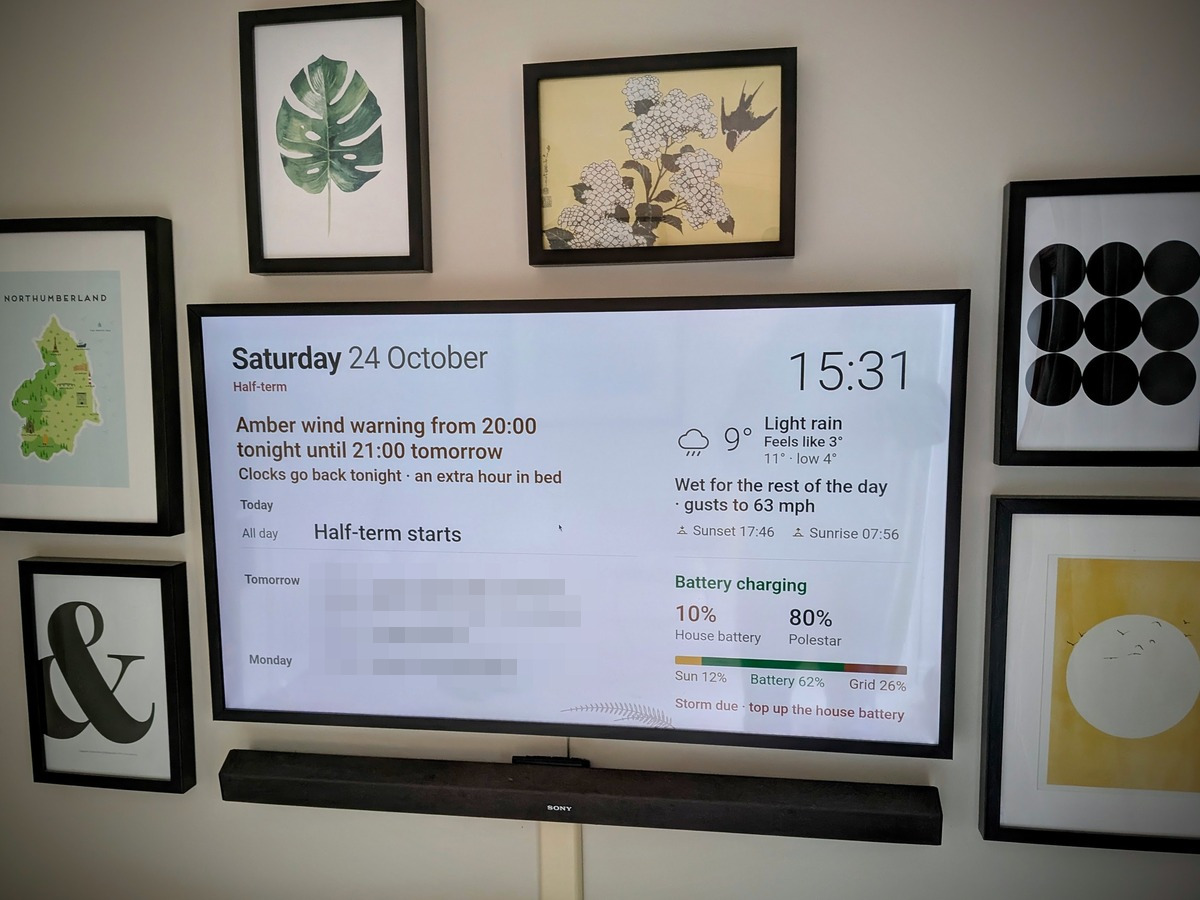
I’m really rather pleased with this home dashboard for Team Belshaw, which I built with Claude Code. It brings together information that would otherwise sit in apps only I (and sometimes my wife, Hannah) can see. Having it on the wall means everyone in the house, including our two teenagers, can see at a glance what’s going on. The aim is a calm, informative hub rather than another screen demanding attention.
While I’m not open-sourcing it, because it’s very specifically tailored to our household, I’m happy to share how it works.
Hardware
An always-on, headless Mac mini M1 does all the work. A small Python server gathers data from a dozen sources in the background and then serves the dashboard as a web page. A Raspberry Pi 3 Model B (v1.2) runs a full-screen Chromium browser (Raspberry Pi OS Lite, with the cage kiosk compositor, to be specific) and displays the page on a 2018 Samsung The Frame 43" over HDMI.
The Pi also uses HDMI-CEC to switch the TV on at 06:30 and off at 23:00. As the Frame is an LCD, there’s very little risk of burn-in, and we'll still be using it occasionally for TV and films anyway.
My first attempt used an old Xiaomi Mi Box S I had lying around, but it couldn’t reliably switch the TV on and off. Android TV doesn’t let ordinary apps send CEC power commands, which sucks. Whenever the TV went into standby, the Mi Box went to sleep with it and dropped off the network, so nothing could wake it in the morning. Thankfully, the Pi doesn’t have either problem.
Data
Everything that's collated on the dashboard comes from APIs and public sources:
- Calendar
- Shared family Google Calendar, checked every minute.
- Weather
- Open-Meteo for the forecast, air quality, and pollen
- Met Office severe weather warnings for Northumberland
- Environment Agency flood warnings
- AuroraWatch UK just in case we're able to catch it
- Energy
- Tesla Fleet API (via pypowerwall) for our Powerwall and solar, with a small daily breakdown of how much of our power came from sun, battery, and grid
- Octopus Energy API for our Intelligent Octopus Go cheap-rate window and free electricity sessions
- Our Polestar 2’s charge level (via the unofficial pypolestar library).
- Household:
- Bin collection days from Northumberland County Council’s website
- School holidays from the school’s own public calendar
- UK bank holidays via GOV.UK
Birthdays and anniversaries come from a family list rather than the calendar. They appear only on the day, and there’s a gentle reminder to post a birthday card for relatives who don’t live with us. The look of the home dashboard changes with the seasons: a warm 'paper' feel by day and a darker palette after sunset, along with a faint seasonal line drawing in the corner.
Design rules
There's so much you could show on this kind of dashboard, so most of the effort went into what not to show. Everything has to be readable from 3-4 m away, and notices should only appear when they matter – e.g. 'Bins out tonight: blue', frost warnings, the clocks changing (like tonight), or a Met Office weather warning. The energy panel involves one simple sentence and two percentages rather than a wall of kW figures. I've also deliberately not included exam reminders or countdowns to going back to school.
Along the way, I used Claude to set up 'councils' of reviewers with different perspectives: a family wellbeing reviewer, a reliability engineer, a visual designer and a maintenance planner. They critiqued each iteration before anything changed on the wall. It's such a useful and powerful way to get different perspectives.
Why now?
I'm doing this as groundwork for our upcoming kitchen renovation, which includes knocking down the wall this TV currently hangs on to create a kitchen-diner. At the moment, what’s officially the dining room we call the 'spare lounge', and is a space where we chill out, listen to music, and watch TV.
Reconfiguring the space means we'll be living a little differently once the work is done, and so this is an attempt to get ahead of the curve.
Enjoyed this? Get new notes by email
A digest of new notes, daily, weekly or monthly. Confirm by email, unsubscribe any time. Prefer a feed reader? Subscribe via RSS.
Around this note
Shares soil with
Suggested by AI from similar content
Yes, there's a cursor in the middle of the screen in the photo. I'm working on it!